A security guard knows an apartment is about to become vacant. A tenant wants to see it. The owner wants a suitable occupant. An operations employee is coordinating calls, access, documents and dates. An administrator needs to know which rentals are moving and which need intervention.
They are all working on the same rental, but rarely on the same task at the same time. A listing page cannot represent that work. Neither can a single status called “in progress.”
My product and engineering work on Rental OS centres on those handoffs. There are separate guard, operations, tenant, owner and admin surfaces. Underneath them, linked records preserve what happened and decide who can take the next step. The source is open under the MIT licence, so the function names below are real and readable.
This is the intended journey through the implemented records, including what verification found. The project work period is July to August 2026; the code described is main as of September 23. Amounts are hypothetical, not customer transactions, and nothing here claims a rental completed in production.
A vacancy becomes something the team can act on
The guard starts with a lead: a report of a possibly available flat, submitted from a phone through leads.create. It records the building, floor, flat, owner phone, availability and the owner’s consent to be called. It is useful supply information. It is not yet a listing.
The backend checks, in order: consent is present, the guard’s society is active, the selected building belongs to that society and is active, and rent (if given) is a whole number of paise. Two limits then apply: a per-guard daily cap read from system configuration, which defaults to 5, and a fixed-window rate limit of three submissions a minute. Changing a form field in the browser does not widen a guard’s territory or their quota.
Submission also resolves the owner phone to a canonical owners record, created if it does not exist, keyed by the normalized number. The same owner reported for two flats lands on one record. That record is separate from any login account: a phone call can establish an owner before that person ever signs in.
Duplicates are flagged, not rejected. checkDuplicates looks for the same flat in the same building within 90 days, and the same owner phone in the same society within 30 days. A match stores the lead as POTENTIAL_DUPLICATE with the reason in quality_flags and a pointer to the earlier lead. Rejecting apparent duplicates at the door would throw away context a reviewer might need, such as a second guard confirming the vacancy.
From there the lead has a small, explicit state machine in validateLeadTransition:
| From | To |
|---|---|
SUBMITTED |
NEED_INFO, VERIFIED, REJECTED |
NEED_INFO |
SUBMITTED, REJECTED |
POTENTIAL_DUPLICATE |
DUPLICATE, SUBMITTED |
VERIFIED |
REJECTED |
NEED_INFO is the first handoff back to the field. Operations asks a specific question through requestInfo. updateByGuard lets only the submitting guard edit the lead, only in that state, and the edit moves it back to SUBMITTED for review. The exchange joins the lead’s notes. Verification is a separate record: verifications.create stores the owner call’s outcome and consent and, for a verified call where the owner consented to contact, moves the lead to VERIFIED only if that transition is legal.
Only a verified lead can become a listing, and the normal draft-to-published transition requires a photograph. Each step makes a stronger claim: someone reported a vacancy, the team confirmed it, and now a tenant can browse it.
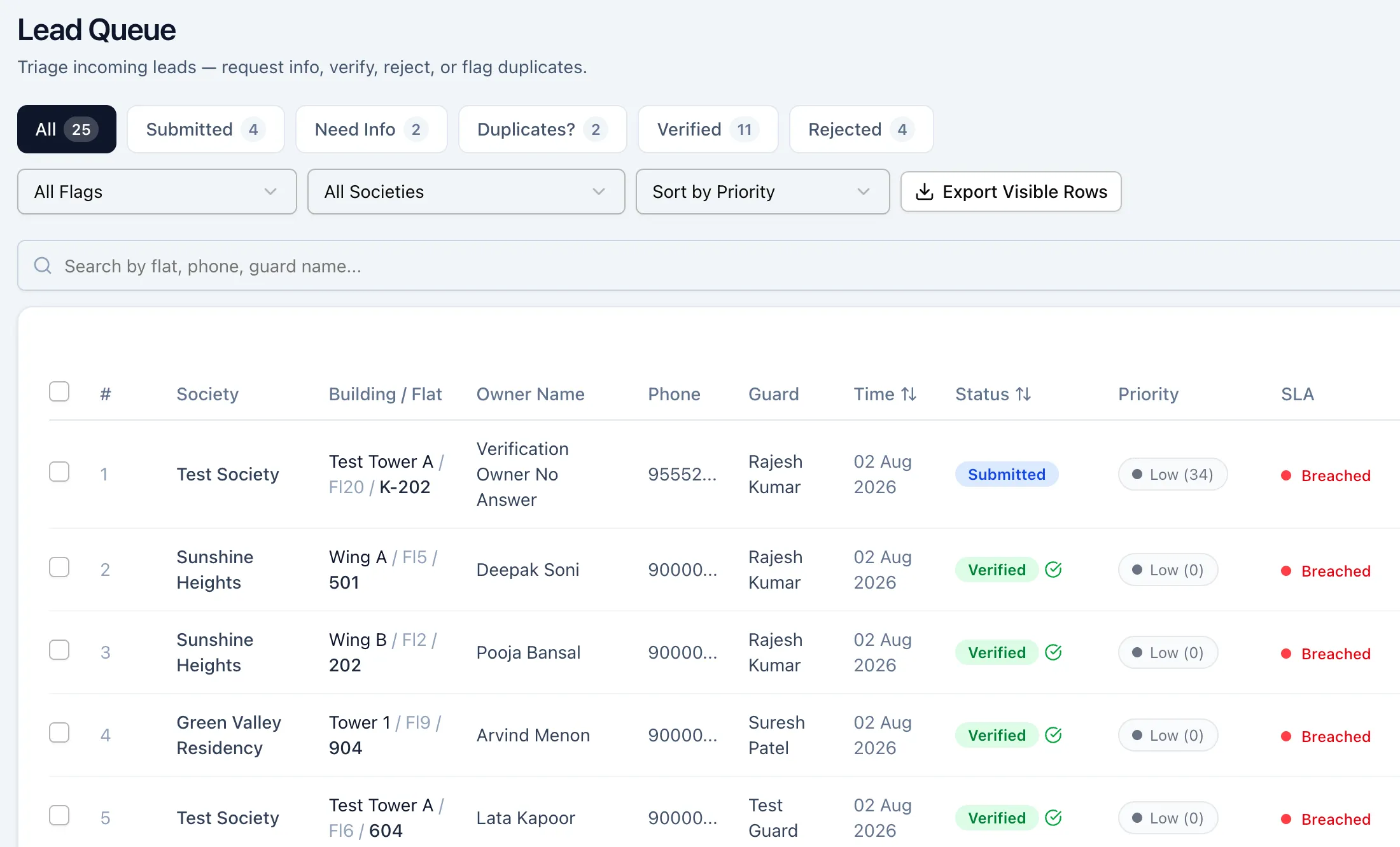
Hosted demo, synthetic seed data, captured 2026-09-23; cropped to the queue. The tabs follow the lead states. Phone numbers are truncated fixture numbers. The SLA column reads Breached because the seed records are dated early August.
Open full-size imageAn inquiry creates work for another person
A signed-in tenant submits an inquiry for a published listing. The inquiry stores the tenant’s account link as well as a name and phone number. That link matters downstream: a callback needs only a phone number, but a negotiation or a transaction needs to know which account is the tenant, and both refuse to start without it.
An inquiry moves through its own statuses: SUBMITTED, REVIEWED, BOUNTY_POSTED, GUARD_ACCEPTED, VISIT_SCHEDULED, VISIT_COMPLETED, NEGOTIATION_INITIATED, and finally CLOSED, REJECTED or EXPIRED. Each name says who acts next.
Operations reviews it and can post a bounty: a payment offered to a field worker for carrying out the visit. A hypothetical $10 bounty pays the worker for the visit. It is not the tenant’s rent and is not charged to the tenant.
tenantInquiries.acceptBounty lets a field worker take the job only if the inquiry is still open for acceptance, the bounty has not expired, the listing is published, the listing’s lead is in the worker’s own society, and nobody else has already accepted it. Acceptance records the assigned worker and moves the inquiry to GUARD_ACCEPTED. After the authorization sweep, the worker receives the scheduling and bounty fields and nothing more; the tenant’s name and phone stay with operations.
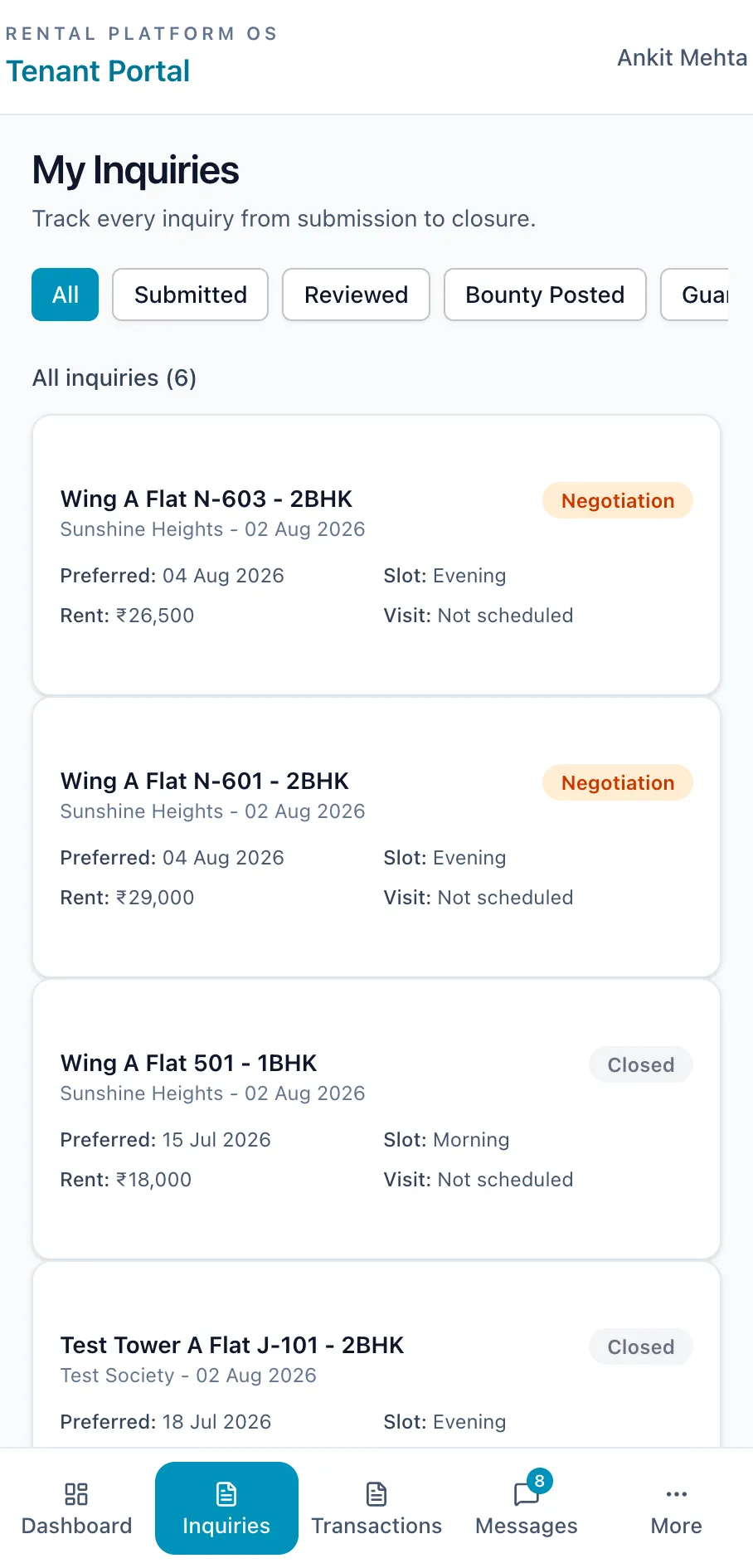
Hosted demo, synthetic seed data, captured 2026-09-23; cropped to the page column. The filter row follows the inquiry statuses. The two Negotiation cards show “Visit: Not scheduled” because the seed sets those statuses directly without linking a visit. It is a fixture shortcut, not a completed visit.
Open full-size imageThe unit that matters is responsibility. The inquiry expresses demand; the accepted bounty says who will act on it; the visit records the appointment and its outcome. Folding those into one row with several loosely related booleans would make it much harder to explain who is waiting on whom.
A visit has an owner and an outcome
The assigned worker starts and completes the visit, and a permissioned backoffice path exists for corrections. Visits have their own statuses: ASSIGNED, CONFIRMED, IN_PROGRESS, COMPLETED, CANCELLED and NO_SHOW.
Completion records an outcome. INTERESTED calls internal.negotiations.initiateFromVisit, which checks the inquiry and its tenant link, does nothing if an open negotiation already exists, and otherwise creates the tenant’s private room and activates a new negotiation. FOLLOWUP points the next step at another visit. No other outcome creates a deal.
Cancellation and no-shows go the other way. A trigger on the visits table, registered in the shared mutation wrapper, moves a VISIT_SCHEDULED inquiry back to GUARD_ACCEPTED and clears its visit reference. The correction happens beside the write, so it applies whether a guard, an operations employee or an admin made the change.
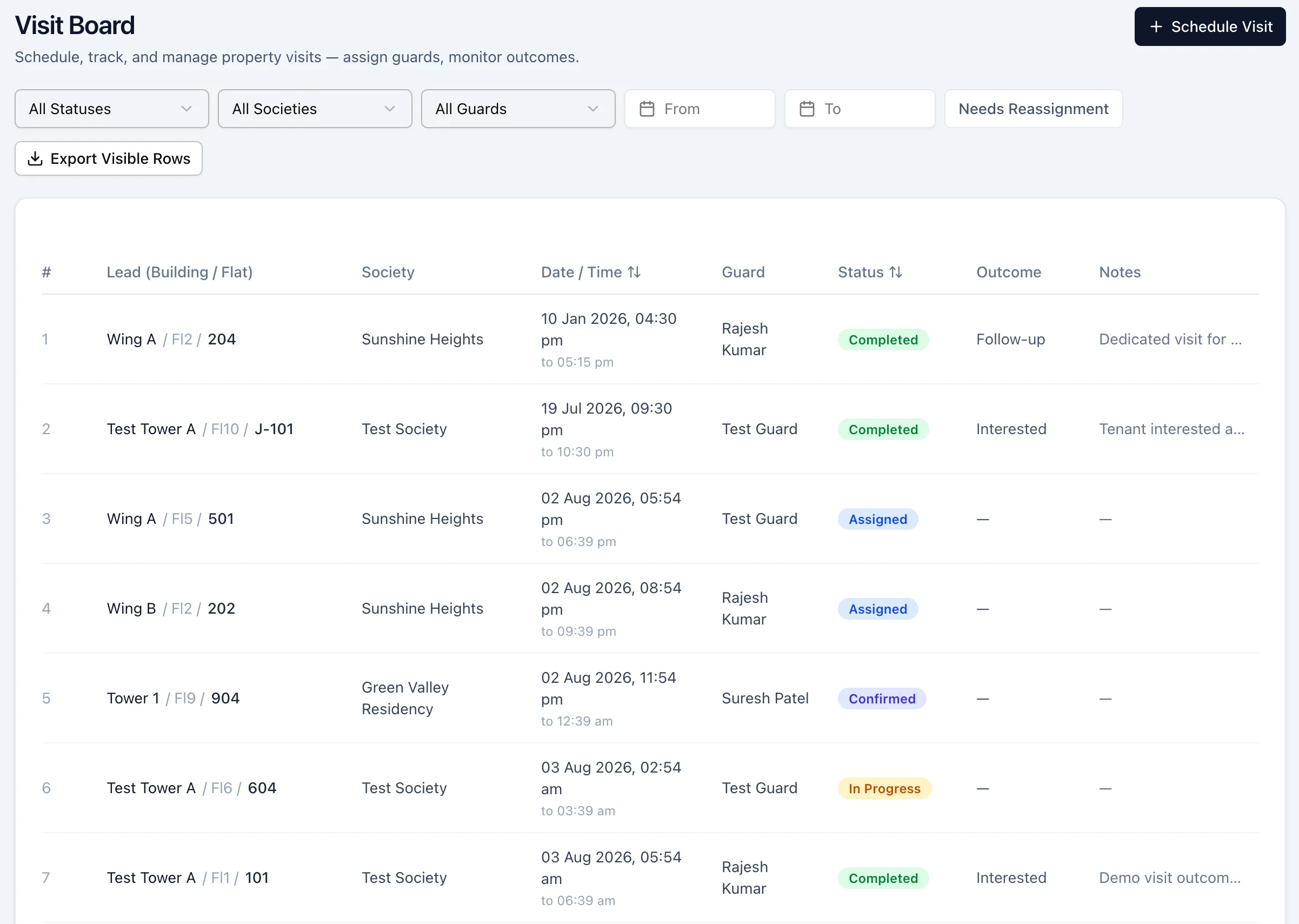
Hosted demo, synthetic seed data, captured 2026-09-23. Statuses and outcomes are separate columns because they answer different questions: where the appointment is, and what it established. An Interested outcome is what starts a negotiation.
Open full-size imageInterest becomes an agreement the parties can inspect
Suppose the tenant and owner are discussing a hypothetical $1,200 monthly rent. They may still disagree about move-in timing, furniture or the security deposit, say $2,400 held against damage and separate from the recurring rent.
Operations needs a private conversation with each side, and somewhere to settle shared terms. Each negotiation has up to three rooms: operations with the tenant, operations with the owner, and a combined room. Room access is decided from the caller’s role in the inquiry, derived from the inquiry and listing records rather than from whichever portal they are using. A tenant never gains access to the owner’s private room just because both rooms concern the same flat.
Structured proposals give acceptance a stable target. Operations creates and shares a versioned proposal. The negotiation points to its active version. A signature on an older version is rejected. When both linked parties sign the active version, it locks and the negotiation moves to TERMS_AGREED.
That path had a real bug. Sharing any revision after the first moves the negotiation to COUNTER_PROPOSED, and the transition table had no edge from there to TERMS_AGREED. The first signature on a revision succeeded and the second always failed, so only first proposals could ever be agreed. The fix adds the edge, rejects signatures up front in states that can never reach agreement, and adds seven regression tests, six of which fail on the old code. After deployment, the same sequence completed on the hosted demo. Inside the deal room tells that story in full.
Application sign-off is still not an external electronic signature or an executed lease.
Agreed terms still leave operational work
Rental OS has several checklist systems because they answer different questions.
A deal checklist asks whether the parties agree with extracted or manually entered conditions. A field inspection checklist asks whether a worker recorded the required observations and photographs. The negotiation checklist asks whether the rental is ready to close. A transaction handover checklist asks whether the move-in tasks are done.
Calling all of these “the checklist” would hide the difference between accepting a condition and carrying it out. Agreeing that keys change hands on Friday is different from recording that it happened.
The negotiation checklist has ten items. Four are derived from other records: accepted terms, both proposal signatures, a collected token advance (a small payment signalling intent to rent, say a hypothetical $200), and recorded brokerage, the arrangement fee, say a hypothetical $600. The other six are operational: police verification, society permission, owner identity verification, rental agreement, key handover and move-in inspection. They are tracked states; none of them proves an external authority acted.
An admin can waive eligible items with a reason, but not the rental agreement, and marking the agreement stamped or registered requires an uploaded PDF. A ready-for-closure checklist can be reopened, with a reason, when more work turns up.
Document collection separately distinguishes a file being collected from it being verified. A rejected document goes back to the person responsible. It is the same handoff pattern as NEED_INFO on the original lead, applied to the evidence needed near completion.
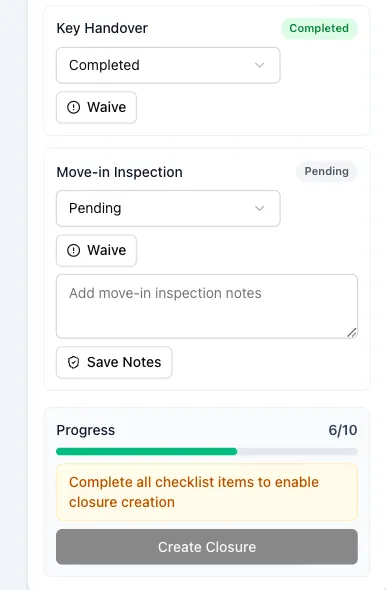
Local synthetic fixture, captured 2026-09-22. Recording key handover moved progress from 5/10 to 6/10; the remaining work still blocks closure. Earlier agreement and payment states in this fixture were seeded, not executed.
Open full-size imageTransaction completion has its own boundaries
The transaction subsystem tracks identity-verification packets, rental agreements, token bookings, deposits and move-in handover. A transaction can start from a completed visit or from an inquiry that has entered negotiation, provided the tenant and owner links exist. A second active transaction for the same listing is refused, so two operators cannot progress two rentals of one flat in parallel.
It is not an automatic continuation of the negotiation. Starting a transaction records its own amounts; it does not copy the accepted proposal. Creating the identity packet is a manual admin step. Those seams matter when judging how much coordination the product actually removes.
Status changes check their evidence: a verified identity packet, both agreement signatures, a recorded or confirmed token booking, and a confirmed deposit sufficient for the signed agreement. Completing move-in requires every item on the transaction’s handover checklist.
The external boundary is explicit. Identity verification and e-signature return simulated results. Generating an agreement creates a structured draft; attaching its document is a separate step. Recording a payment stores a reference and a status; no code creates a payment order or moves money.
Closing the record and handing over the relationship
A closure is the application’s completion record for a rental. Closing the hypothetical $1,200 rental does not move $1,200.
Its checks depend on its links. A linked negotiation must be ready for closure. A linked deal checklist must be approved and belong to the same inquiry. A linked transaction must be completed before the closure can be confirmed. The links are optional arguments, so it would be wrong to say every closure is forced through one universal chain.
Confirmation also tries to assign an ongoing relationship manager for the owner. If that fails, the record keeps a note that manual follow-up is needed. Finishing the rental and assigning its next caretaker are separate outcomes, and it is worth keeping them separate.
What verification covers
The full test suite on main runs 382 passing tests with one skipped. It covers lead boundaries (consent, the daily cap, duplicate windows, society scoping and permissioned triage), portal routing, authentication helpers, the proposal state machine, deal-room access and the authorization fixes. Negotiation checklists, closure-link validation and the transaction prerequisites are still verified by reading the code rather than by dedicated tests, and a populated demo screen is not evidence that the steps before it ran.
Rental OS builds on Next.js and React, Convex’s database and backend functions, WorkOS authentication and established interface libraries. My contribution is the product workflow and the application built across them; preparation, verification and the September fixes used AI assistance.
The next useful step is to test these cross-person handoffs as complete scenarios, including the ones where the next step must be refused. The pattern running through the product is simple to state and hard to keep: preserve enough context that the next person can act, and make an incomplete handoff visible rather than hiding it behind a percentage.
Read the source, or request demo access to walk a lead through the queue yourself.